
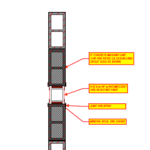
Hello - attached is a plan detail showing a steel column in-line with the 2-HR fire rated CMU wall. We are proposing to fill the small 1-inch joint between the CMU & Steel column with mineral wool fire-safing material, paint the exposed (or all) surfaces of the steel column with intumescent paint, and then treat the joint between the CMU & Steel column with Joint FireSpray. Would it be better to seal the 1" gap with fire-rated joint sealant?
Does Hilti have a tested assembly in place for this?
Please advise - thank you
James A. Giebelhausen
Sr. Project Architect
Perkins&Will - Chicago
Good afternoon James,
There is currently not a listed system for this condition but we can address your application through an Engineering
Judgment which will be a custom detail showing your exact application with the firestop components required to maintain the stated ratings.
We are proud to announce the launch of the HILTI CONSTRUCTION PLATFORM (HCP), our company’s new engineering service website. This platform will be the home for all of your Fire Protection Design needs. Instead of emailing a PDF form for a request, the platform enables you to create new Engineering Judgment (EJ) requests, submit revisions to previously completed EJs or connect with an FPE on a question. HCP also enables you to track the status of your request.
You can find more information on how to access this new platform here: http://www.hilti.com/ej (US) or http://www.hilti.ca/ej (Canada.) If you have any questions or require assistance navigating the platform, please call Customer Service for help at 1-800-879-8000 (US) or 1-800-363-4458 (Canada.)
Along with HCP, Hilti is excited to announce our new mobile app for all your firestop needs: Hilti Firestop Selector. Using the Firestop Selector app gives you easy access to the Hilti Fire Protection Design Team from the jobsite, on the road, or in the office to request a new EJ, an EJ Revision, or a Question anytime, anywhere. You can download the app using the appropriate link below.
Hilti Firestop Selector App – Google Play Store
Hilti Firestop Selector App – Apple App Store
If you have any questions, please reach out to our customer service team at 1-800-879-8000 (US) or 1-800-363-4458 (Canada) for assistance.
1) Register for the Hilti Construction Platform (HCP) https://youtu.be/DD2YRViH9wI
2) Creating a new Engineering Judgment on the HCPhttps://youtu.be/bpHuWuMiL1w
3) Creating a new Engineering Judgment on the Firestop Selector Mobile App https://youtu.be/WYOdMH8p8mU
4) Firestop system search and selection on the HCP https://youtu.be/zAo7dnhWzH0
5) Firestop system search and selection Firestop Selector Mobile App https://youtu.be/3F18WKy2MOo
6) Creating firestop system submittals on the HCP https://youtu.be/hFZkrwzUbJo
7) How to share a project on the HCP https://youtu.be/rFAMBCVoEOM
8) Revise EJ, Copy EJ, and Search Feature for Greater Productivity https://youtu.be/3kDI6NhV2ak
Fire Protection Design Team
Hilti North America
3701 W. Royal Lane, Suite 100, Irving, TX 75063
P 1-800-879-8000 I F 918-254-1679
E usfirestopeng@hilti.com
www.hilti.com/firestop