I keep receiving the message that all floating licenses of HILTI PROFIS are in use even though I know there are available seats. Has anyone has this issue and able to provide a solution
Hi Ryan,
Hilti is not able to see which users are currently occupying seats on a PROFIS Engineering floating license. We recommend coordinating with your administrator and colleagues to determine which users may be currently occupying a seat. In addition, the administrator has the ability to add/remove users on the floating license as needed.
If all seats on a floating license are being used at once, then each additional user will only be able to access the standard features and the file may not open. Please also note that multiple users cannot open the same file at once. To access a file, all other users will need to exit the file.
When users properly logout of PROFIS Engineering, the seat will become available immediately. In the case where users remain logged in, the software will auto-logout users from a seat after 1 hour of inactivity.
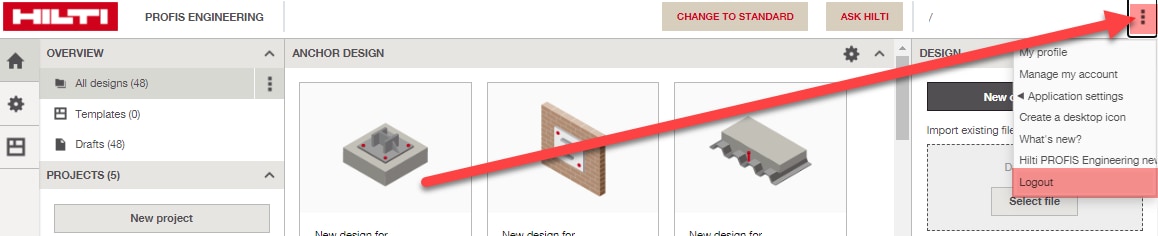
To ensure that other users logout, select the three dots on the upper right hand corner of the screen to expand a drop down menu, then select "logout" -- see screenshot attached. It is important that users properly log out of the software in order to free up seats. Please note that closing out of the internet browser page will not properly log out of PROFIS Engineering.
If the issue still persists, please email your inquiry to hnatechnicalservices@hilti.com.
Regards,
Emily