
Cart

Autodesk Revit integration with Profis Baseplate

Posted by Tom Tiedemannover 2 years ago
Autodesk Revit integration with Profis Baseplate

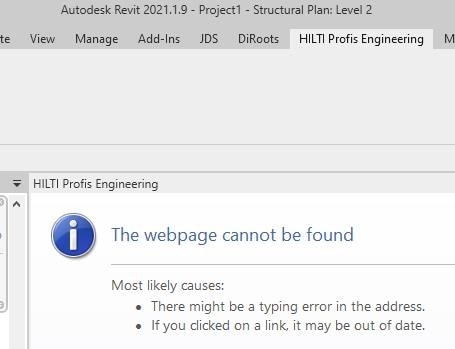
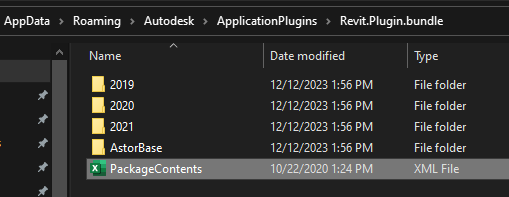
I am trying to install the HILTI Profis Engineering plugin for Revit. We currently use Revit 2022. The installer asks which version of the plugin to install (Revit 2021 thru 2024). However no matter which option you pick the installer will install plugins for versions 2019 thru 2021. Even when you try to use the plugin in Revit 2021, the plugin can't connect to HILTI so we can't login and download the baseplate design. So the plugin is basically unusable for us at the moment.
Hilit Profis,Revit Plugin software,Revit Profis Engineering Plugin

6 Replies
Posted by Eduardo Acevesover 2 years ago

Please send me a snapshot of the Windows version that you have on your computer. The plugin version should work with your Revit version.


1 comment on this reply
Posted by Tom Tiedemannover 2 years ago
Edition Windows 10 Pro for Workstations Version 22H2 Installed on ‎10/‎29/‎2022 OS build 19045.3693 Experience Windows Feature Experience Pack 1000.19053.1000.0

Posted by Eduardo Acevesover 2 years ago

Hello, I forgot to mention, do you have admin rights to install the Revit version? If not have your IT team help.


1 comment on this reply
Posted by Tom Tiedemannover 2 years ago
Yes I have permission to install anything. I installed Revit 2021 just to test the plugin, but like I mentioned even that version didn't work.

Posted by Eduardo Acevesover 2 years ago

Hello Tom,
I shared a link to download a newer version of Revit. Let me know if that works better for you.


1 comment on this reply
Posted by Tom Tiedemannover 2 years ago
I download the file and installed the plugins, but nothing has changed. The plugin does not appear in Revit 2022 (or Revit 2024 which we also have installed). In Revit 2021 the Profis tab appears, but when I try to login to Profis it says 'Navigation to the webpage was canceled'

Posted by Eduardo Acevesover 2 years ago

I shared the link via your e-mail address.


Posted by Eduardo Acevesover 2 years ago

Please try un-installing plugins you previously installed and re-install the newer one I provided.


1 comment on this reply
Posted by Tom Tiedemannover 2 years ago
Yes I tried removing the plugins and re-installing them, and the result was the same.

Posted by Eduardo Acevesover 2 years ago

I'm sorry this is not working for you. Just to be clear, it is not working for you for Revit 2021, 2022, 2024?

It would be helpful if you can please send me snapshots of what it looks like for each individual Revit version so I can submit the issue to our Global team. If it is the same result for each, just let me know. Thanks


1 comment on this reply
Posted by Tom Tiedemannover 2 years ago
The snapshots are in the original post. In Revit 2021 the Profis tab appears but cannot connect to the website to login. For Revit 2022 and above the plugin tab does not appear at all. The plugin installer seems to install the plugins for Revit 2019 thru 2021 only, it doesn't even install for 2022 or above no matter what Revit version boxes you check during installation.